Introduction: Instagram Tracking Has Become More Complicated
Every day, millions of Instagram users find themselves asking similar questions about their audience: Who recently unfollowed me? Which accounts am I following that do not follow me back? Has my follower count grown over the last month, or am I losing followers faster than I gain them? Do these two specific accounts interact with each other's posts?
Whether you are an individual managing a personal account, a content creator growing a community, a brand manager maintaining professional relationships, or a researcher analyzing network dynamics, understanding follower relationships is vital. However, Instagram’s native mobile application and web interface do not provide comprehensive historical relationship logs or built-in tools for automated relationship comparisons.
To make matters more challenging, recent updates rolled out across Instagram in late 2026 modified how follower lists are ordered and presented. Mobile applications that relied on simple chronological lists now fail or return inconsistent results. As a result, choosing the right Instagram follower tracker in 2026 requires looking beyond basic "who unfollowed me" mobile apps to evaluate tools based on security, analytical depth, historical data preservation, and integrated account management capabilities.
Instead of juggling multiple specialized services—a mobile app to detect unfollowers, a separate web dashboard for growth graphs, a Chrome extension for bulk relationship maintenance, and an external cloud tool for interaction tracking—many users are recognizing the efficiency of integrated solutions. This article explores the full landscape of Instagram tracking solutions in 2026 to help you determine which tool meets your operational and analytical requirements.
1. Understanding the Different Categories of Instagram Tracking Tools
When searching for an Instagram follower tracker, you will encounter software built on vastly different architectures and designed for distinct purposes. Understanding these categories prevents frustration and helps match the right tool to your specific requirements:
- Basic Unfollower Applications: Typically mobile-first applications that compare two static snapshot scans of your account to highlight accounts that do not follow you back. They focus almost exclusively on single-dimension "who unfollowed me" alerts but rarely provide long-term historical trends, bulk relationship actions, or deeper interaction analysis.
- Bulk Follower Management Extensions: Browser-based extensions designed to streamline relationship maintenance directly inside Instagram's web interface. They allow users to search, filter, and execute follow or unfollow actions on multiple selected accounts in sequence, eliminating tedious manual profile navigation.
- Audience Analytics Platforms: Marketing-oriented software that visualizes follower counts over time, audience demographics, and broad engagement ratios. While helpful for corporate brand reporting, they often lack granular account-level relationship details, such as identifying specific individual username changes or lost followers.
- Historical Follower Trackers: Tools that record full profile baseline snapshots during every scan. By storing past observations locally or securely, they enable detailed delta comparisons—showing net growth, exact lost followers, new followings, mutual relationship changes, and username change history across days, weeks, or months.
- Third-Party Interaction & Activity Services: Cloud-based analytics tools that monitor public interactions (such as likes and comments) between specific accounts or across public grids.
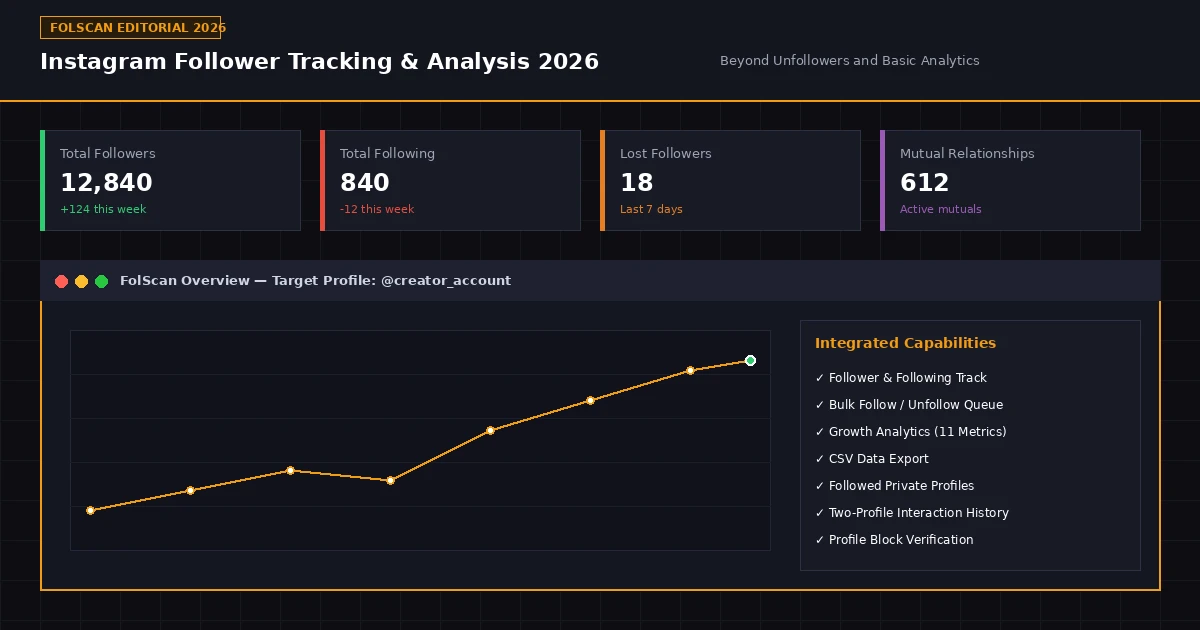
While historically users had to combine three or four separate utilities to cover these needs, modern integrated browser extensions like FolScan combine follower tracking, historical baseline comparisons, bulk management queues, growth analytics, CSV data exports, and cross-profile interaction reports within a single, unified workflow.
2. Understanding Who Follows and Unfollows an Account
The primary reason most users search for an Instagram unfollower tracker is to solve a fundamental question: Who is no longer following me? However, relationship dynamics on Instagram are multifaceted, requiring distinct classifications:
- Not Following Back: Accounts that you actively follow, but which do not follow your account back.
- Not Following Me Back: The inverse relationship—accounts that follow you, but which you do not follow back.
- Lost Followers: Accounts that were confirmed to follow you in a previous scan, but were no longer present in a subsequent scan.
- New Followers & New Followings: Newly detected relationships created between reporting periods.
- Mutual Relationships: Accounts where both profiles follow each other reciprocally.
- Unfollowed Accounts: Profiles that you previously followed but have since unfollowed.
The Crucial Difference: Non-Followers vs. Lost Followers
A common misconception is treating "Not Following Back" and "Lost Followers" as identical. An account in your "Not Following Back" report might be a public celebrity or brand you followed years ago who never followed you back in the first place. Conversely, a Lost Follower represents a specific account that actively unfollowed you (or deactivated their profile) between two completed scans. Accurately identifying lost followers requires historical snapshot comparisons.
FolScan handles this by saving complete historical snapshots locally on every scan. When a new scan completes, FolScan performs a delta comparison against prior observations, clearly distinguishing between ongoing non-followers and accounts that recently unfollowed you.
To make scanning more efficient, FolScan introduces directional scanning. Users can choose to scan only Followers, only Following, or Both. If you only want to check your newest followers, running a Followers-only scan completes substantially faster and uses far fewer network requests. Note that cross-directional analyses (such as identifying mutual followers or accounts not following back) require both Followers and Following datasets to be scanned.
3. Managing Instagram Followers and Following in Bulk
Identifying accounts that do not follow you back is only the first half of audience management. The real challenge arises when you want to act on that information. If an account follows 800 profiles and discovers that 250 do not follow back, manually navigating to 250 individual profile pages on Instagram to click "Unfollow" is excruciatingly slow and repetitive.
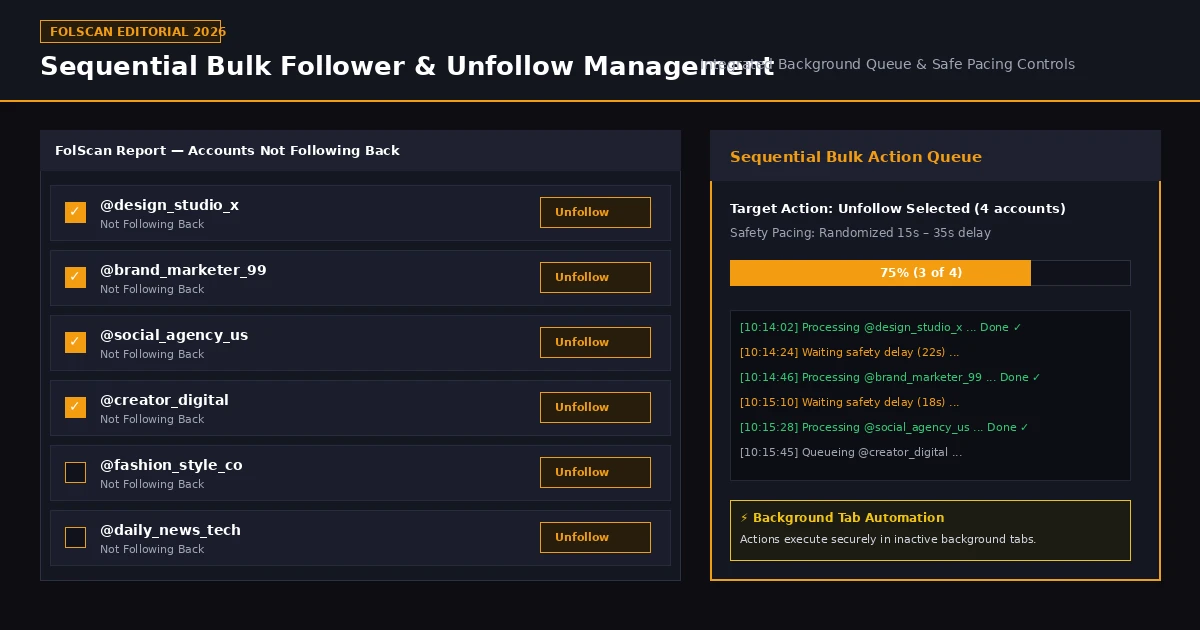
Figure 2: FolScan's sequential bulk management interface showing checkbox account selection, background tab processing, status indicators, and safe randomized pacing delays.
Integrated Instagram follower management extensions solve this friction by offering report-level actions and sequential bulk execution queues:
- Report-Level Search & Filtering: Quickly filter your "Not Following Back" or "Lost Followers" lists by username, display name, or specific criteria.
- Single-Click Action Buttons: Click "Follow" or "Unfollow" directly beside any row in a report without leaving your analysis dashboard.
- Multi-Account Selection: Use checkboxes to select 10, 25, 50, or more accounts across any report section.
- Sequential Bulk Queue: Submit selected accounts to a queue that processes actions automatically in sequence.
- Silent Background Processing: FolScan opens temporary, inactive background tabs to perform actions directly within Instagram's web interface, allowing you to continue browsing normally without interruptions.
- Real-Time Visual Progress: A live progress panel displays status checkmarks (✔), queue counts, and plays an optional completion chime when the task completes.
Important Scope & Account Safety Disclosure
Own-Account Scope: FolScan's bulk follow and unfollow automation strictly applies to the logged-in Instagram account on your browser. It does not and cannot modify follower relationships for third-party profiles.
Platform Safety & Pacing: To safeguard your account, FolScan inserts safe, randomized delays (typically 15 to 35 seconds) between consecutive actions to mimic human behavior. However, all bulk operations remain subject to Instagram's platform limits, rate restrictions, and Terms of Service. Pacing minimizes risk but cannot eliminate platform restrictions if account limits are exceeded.
4. Growth Analytics and Interactive Graph Analysis
While static lists tell you who follows you right now, they fail to reveal audience trends over time. For content creators, digital marketers, and growing businesses, evaluating audience trajectory across weeks and months is crucial for measuring campaign performance and content resonance.
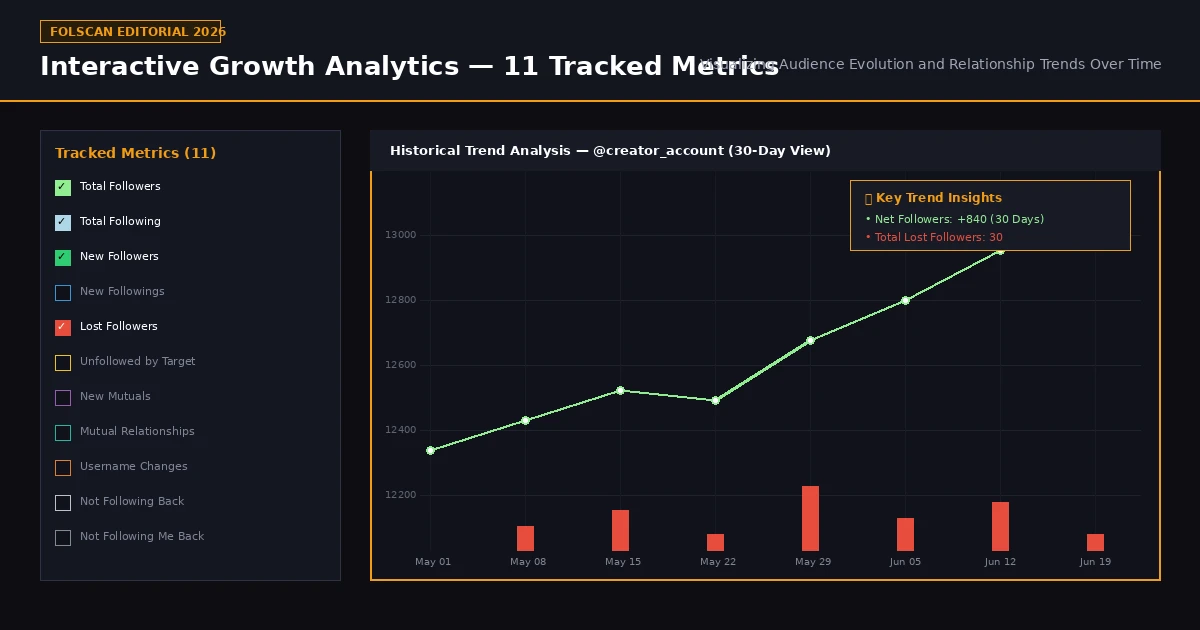
Figure 3: FolScan Premium's Growth Analytics Dashboard rendering interactive timeline trends across 11 distinct tracked relationship metrics.
Moving beyond basic follower trackers, FolScan Premium includes an interactive Growth Analytics Dashboard. By aggregating historical scan observations, it plots relationship changes on an interactive timeline chart. The dashboard tracks exactly 11 distinct metrics:
- Total Followers (
followers): Total verified follower count at each scan point. - Total Following (
following): Total accounts you actively follow over time. - New Followers: Newly gained followers detected between consecutive scans.
- New Followings: New accounts you began following between scans.
- Lost Followers: Accounts that stopped following you between scan points.
- Unfollowed by Target: Accounts you previously unfollowed that subsequently unfollowed you back.
- New Mutuals: Newly formed reciprocal mutual relationships.
- Mutual Relationships: Total active mutual connections.
- Username Changes: Detected handle changes among tracked accounts in your history.
- Not Following Back: Total count of accounts you follow who do not reciprocate.
- Not Following Me Back: Total count of accounts following you that you do not follow back.
Users can toggle individual metrics on or off to isolate specific trends—for instance, overlaying New Followers against Lost Followers to visualize net growth velocity. It is important to note that while historical charts clearly illustrate when relationship shifts occurred, they reflect observable data trends rather than proving the subjective reasons behind individual follow or unfollow decisions.
5. Downloading Instagram Followers, Reports and Historical Data
In-browser analytics dashboards are convenient for quick checks, but power users often require offline records, custom data manipulations, or permanent archival storage. Having direct access to raw relationship data protects your historical records independently of any single software interface.
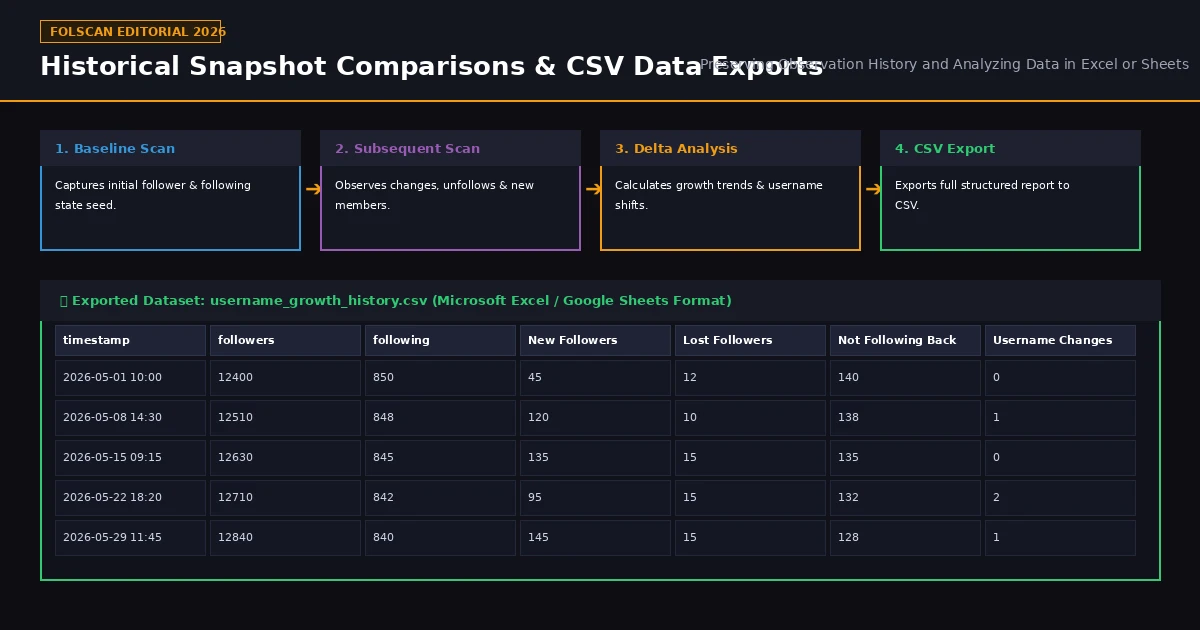
Figure 4: Data pipeline showing baseline scanning, delta comparison, and structured CSV dataset export for analysis in Microsoft Excel or Google Sheets.
Common practical use cases for downloading Instagram followers include:
- Spreadsheet Analysis: Opening structured reports in Microsoft Excel, Google Sheets, or Apple Numbers to apply custom formulas, filters, or pivot tables.
- Client & Executive Reporting: Incorporating verified follower growth and lost follower metrics into monthly social media client audits.
- Permanent Historical Archives: Maintaining offline backups of your audience growth history over multi-year periods.
- Cross-Platform Merging: Combining Instagram follower datasets with email CRM databases or sales leads.
FolScan supports CSV (Comma-Separated Values) export functionality across both active scan reports and long-term growth history (e.g., generating username_growth_history.csv). This ensures users retain full ownership and portable access to their analyzed relationship metrics.
6. Analyzing Other Instagram Accounts, Including Followed Private Profiles
Many analytical requirements involve examining accounts other than your own. For example, researchers, marketers, and creators frequently analyze public creator profiles, competitor brand pages, or industry peers.
Existing tools fall into two distinct operational models:
- External Cloud Scrapers: Third-party websites that query Instagram remotely. These tools can only inspect fully public profiles and frequently break when Instagram updates its public endpoints.
- Session-Based Browser Extensions: Extensions like FolScan that operate directly within your existing, authenticated Instagram web browser session.
Because FolScan operates within your active browser session, it can analyze both publicly accessible Instagram profiles and private accounts that your signed-in user already follows. This provides substantial analytical flexibility compared to cloud scrapers that fail on private accounts.
Strict Privacy & Platform Limits Standard
FolScan strictly respects Instagram's privacy architecture. It does not bypass Instagram privacy controls or unlock private profiles that your signed-in account does not have permission to view. Furthermore, third-party profile scanning is subject to Instagram rate limits and session permissions.
7. Understanding Interactions Between Two Instagram Profiles
Standard follower trackers focus exclusively on follower list memberships. However, relationship analysis frequently requires investigating whether two specific Instagram accounts actually engage with each other's published content.
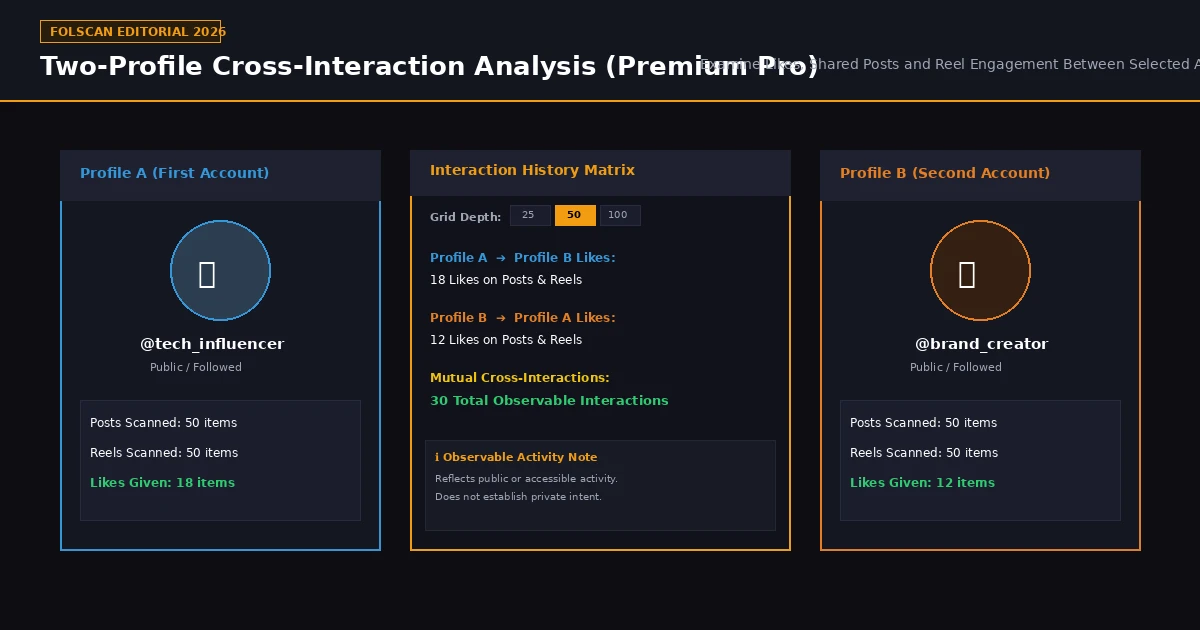
Figure 5: FolScan Premium Pro's Two-Profile Interaction History matrix analyzing cross-profile likes, post engagement, and Reel interactions across configurable scan depths.
Manually scrolling through hundreds of posts and Reels to spot whether Account A liked Account B's posts is virtually impossible. FolScan Premium Pro solves this through its specialized Interaction History engine:
- Two-Profile Selection: Input any two accessible Instagram usernames (neither profile is required to belong to you, provided both are public or private profiles you follow).
- Directional Interaction Cross-Checking: Scans accessible content grids to identify directional likes on recent posts and Reels from Profile A on Profile B's content, and vice versa.
- Shared & Collaborative Content: Detects joint publications, co-authored Reels, and cross-profile interactions.
- Configurable Scan Depths: Choose an analysis depth of 25, 50, or 100 recent media items per content grid to balance thoroughness with execution speed.
To maintain editorial objectivity, interaction reports reflect observable, accessible public activity. They provide visual evidence of past engagement but cannot establish private intent or prove that unobserved offline interactions did not occur.
8. Checking Whether Someone Has Blocked You
Instagram never sends notifications when an account blocks you. When a profile suddenly disappears from your feed or search results, users are left wondering what happened.
FolScan incorporates a dedicated Profile Block Check utility. When you run a block check on a target handle, FolScan evaluates endpoint responses across multiple session states to distinguish between likely scenarios:
- Likely Blocked: The profile is accessible publicly or from secondary sessions, but returns restriction errors from your primary session.
- Account Deactivated or Deleted: The profile handle returns 404/not found across all access pathways.
- Username Changed: The target account remains active under a newly adopted handle.
Because Instagram continuously updates its edge responses, no tool can claim 100% infallible block detection. FolScan provides probabilistic indicators based on observable session diagnostics rather than absolute guarantees.
9. Instagram's 2026 Changes and the Problem of Chronological Follower Lists
In September 2026, social media developers across the industry observed significant changes to Instagram's web and API endpoints. Historically, Instagram returned follower and following lists in strict reverse-chronological order (showing your newest followers first). The 2026 updates randomized or algorithmically sorted relationship lists across many endpoint requests.
This change broke basic unfollower apps that relied on list position to infer recent activity. To overcome this limitation, FolScan uses a resilient baseline snapshot architecture:
- Seed Baseline Creation: When you run your first scan, FolScan establishes a verified baseline snapshot of your relationships.
- Multi-Pass Data Validation: Advanced recovery algorithms make multiple passes to verify complete relationship counts even when Instagram endpoints return opaque or hybrid cursors.
- Delta Comparison Engine: Subsequent scans compare full unique user sets against your historical baseline, accurately identifying new followers and lost followers regardless of Instagram's internal list ordering.
By relying on full-set mathematical delta comparisons rather than assumed chronological list positions, FolScan maintains accurate tracking despite platform-level ordering changes.
10. Comparing FolScan With Other Instagram Tracking Solutions
To help you select the best solution for your needs, the table below compares FolScan with established and emerging alternatives across key functional dimensions in 2026:
| Capability / Feature | FolScan (Extension) | IGDetective | Snoopreport | FollowDiff | Mass Unfollow Tools |
|---|---|---|---|---|---|
| Architecture | Browser Extension | Browser Extension | Cloud Web Service | Web Upload/Diff | Browser Extension |
| Basic Unfollower Detection | Yes | Yes | No | Yes | Yes |
| Historical Delta Baselines | Yes | Basic | No | Manual | No |
| Bulk Follow / Unfollow Queue | Yes (Safe Pacing) | No | No | No | Yes |
| Interactive Growth Analytics (11 Metrics) | Yes | No | Activity Only | No | No |
| CSV Data Exports | Yes | Limited | Yes | Yes | No |
| Followed Private Account Analysis | Yes | Yes | No | No | No |
| Two-Profile Interaction Analysis | Yes (Premium Pro) | No | Public Likes | No | No |
| Profile Block Checker | Yes | No | No | No | |
| Instagram Password Required? | No (Uses Web Session) | No | No | No | Often Yes |
As illustrated above, while individual tools excel in narrow niches—such as Snoopreport for public cloud activity monitoring or specialized mass unfollow tools for aggressive cleaning—FolScan's primary value lies in consolidating tracking, bulk management, historical trend analytics, data exports, and interaction reports into a single, secure browser extension.
11. Privacy, Security and Practical Limitations
Account security should always be your top priority when selecting an Instagram management tool. Thousands of Instagram accounts are compromised annually after users enter their Instagram credentials into unverified mobile apps or cloud scraping websites.
Why Browser-Session Architecture Is Safer
FolScan operates locally inside your official web browser (Chrome/Brave/Edge). It uses your existing active Instagram session cookies and never asks for your Instagram password. All analyzed follower data is stored locally in your browser's extension storage, preventing your private relationship data from being sold to third parties.
However, no automated tool is immune to platform constraints. To maintain safe operations, keep the following practical limitations in mind:
- Platform Rate Limits: Instagram enforces dynamic hourly and daily request limits. Running extremely frequent scans on massive accounts (50,000+ followers) can trigger temporary rate limits (HTTP 429).
- Respect Safety Delays: Never attempt to bypass safe pacing delays during bulk follow or unfollow operations.
- Session Dependency: Because session extensions operate within your active browser, logging out of Instagram.com pauses background actions until you sign back in.
12. Choosing the Right Instagram Tracker: Conclusion
Selecting the best Instagram follower tracker in 2026 comes down to evaluating your specific operational workflow. If you only need a quick one-time check of non-followers, a basic app may suffice. But if you want to eliminate repetitive manual profile visits, analyze long-term growth trends across 11 key metrics, export CSV reports, analyze accessible private profiles, and examine cross-profile interaction histories, an integrated solution is far more effective.
By consolidating these capabilities into a single Chrome extension that operates securely within your local browser session, FolScan provides the depth, control, and efficiency modern Instagram users require.